Job and document management

Organise every job.
Prepare the paperwork.

DocuStruct is a desktop app for small and medium businesses. Sync client and job details from the system you already use, set up consistent folders, and prepare documents from your own Word templates—with details coming from your records rather than typed in by hand.
DocuStruct

How it works

Your job system keeps the records. DocuStruct handles the setup.

  1. Sync from the system you already use

    Client and job details flow in from your business system. It stays your master record; DocuStruct only reads from it. Then find the right client or job as you type, even from part of a name.
  2. Give every job the same footing

    Each new job gets its own folder on your computer, complete with the subfolders your team always uses. No more hunting for files or guessing where things go.
  3. Turn templates into documents

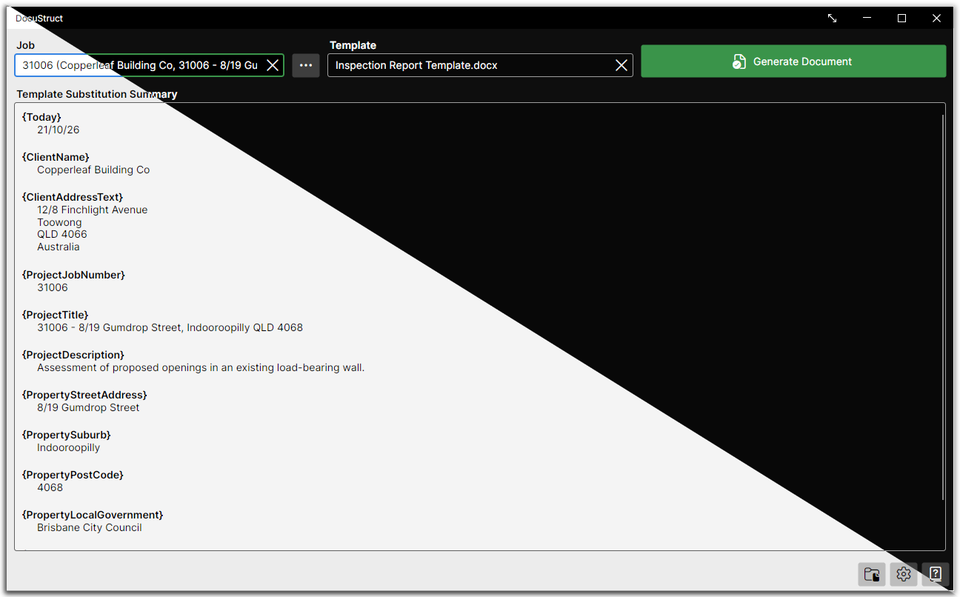
    Pick one of your Word templates and DocuStruct fills in the client and job details. Check the preview, then create the finished document.

What DocuStruct does

From first sync to finished document.

DocuStruct takes care of the repetitive parts of starting a job, so your team can get on with the work itself.

  1. Bring in details and keep working offline

    Sync clients and jobs from your existing system. Once synced, DocuStruct keeps working without an internet connection; sync again whenever you need new or changed details.

  2. Find clients and jobs quickly

    Search with a full name or just part of it to get to the right client or job faster.

  3. Set up every job the same way

    Choose where job folders are created and which subfolders each job gets, so files end up where everyone expects to find them.

  4. Use your own Word templates

    Use the Word documents you already have as templates. DocuStruct fills in client and job details from your records, so names, numbers and addresses are far less likely to go wrong. Preview the result before creating the document.

  5. Flexible enough for real-world paperwork

    Documents rarely follow one tidy pattern, and DocuStruct doesn’t expect them to. Its rules for what goes where are flexible enough to handle special cases and custom formatting, so the finished document reads the way your business writes it.

  6. Prepare a client email

    Instantly open a draft in your usual email app, with the client’s email address and a custom subject already filled in. Add your message and send it when you’re ready.

Made for your desktop

Looks at home on your computer.

DocuStruct follows your computer’s light or dark appearance and picks up your accent colour, so it feels like part of the desktop rather than something bolted on.
The DocuStruct window split diagonally between light mode and dark mode, showing a job, a template and the details that will fill the document.

Product roadmap

What's here today, and where it's heading.

DocuStruct is shaped by the people who use it, so what comes next depends on how businesses actually work. The roadmap is a guide rather than a promise, and priorities can change as we hear from you.

Available now

Job details and folders

  • Sync clients and jobs from Roll HQ.
  • Find clients and jobs quickly, even from partial names.
  • Create consistent job folders, with your standard subfolders, on your computer.

Documents and email

  • Create Word documents from your own Word templates.
  • Flexible rules for what goes where, including special cases and custom formatting.
  • Preview the details filled into a document before creating it.
  • Instantly draft a client email in your usual email app.

Platforms

  • Windows and Linux.

Planned

More platforms and places

  • macOS.
  • Job folders on SharePoint/OneDrive, Google Drive, and network drives.

More systems

  • Sync from Xero.

More document options

  • A full preview of the finished document.
  • OpenDocument templates.
  • Export as OpenDocument or PDF files.

Need something that’s not here? Let us know.

Download

DocuStruct for Windows and Linux.

A macOS version is planned.
Download the latest version

Support and contact

Questions, problems, or ideas?

If you need a hand getting set up, run into a problem, or have an idea that would make DocuStruct work better for your business, get in touch. What you tell us helps decide what comes next.
Support email
PLACEHOLDER: support email to be provided
Feedback
PLACEHOLDER: feedback contact to be provided